
Brick Insights: Unveiling LEGO's Data Universe
Tools Used:Microsoft SQL Server, Excel, Tableau, MecaBricks

In this project, I embarked on a colorful journey through queries and data visualizations to decode the trends and stories woven within LEGO's iconic bricks. You can follow along with me by downloading this dataset from Kaggle and using my queries in SQL Server.
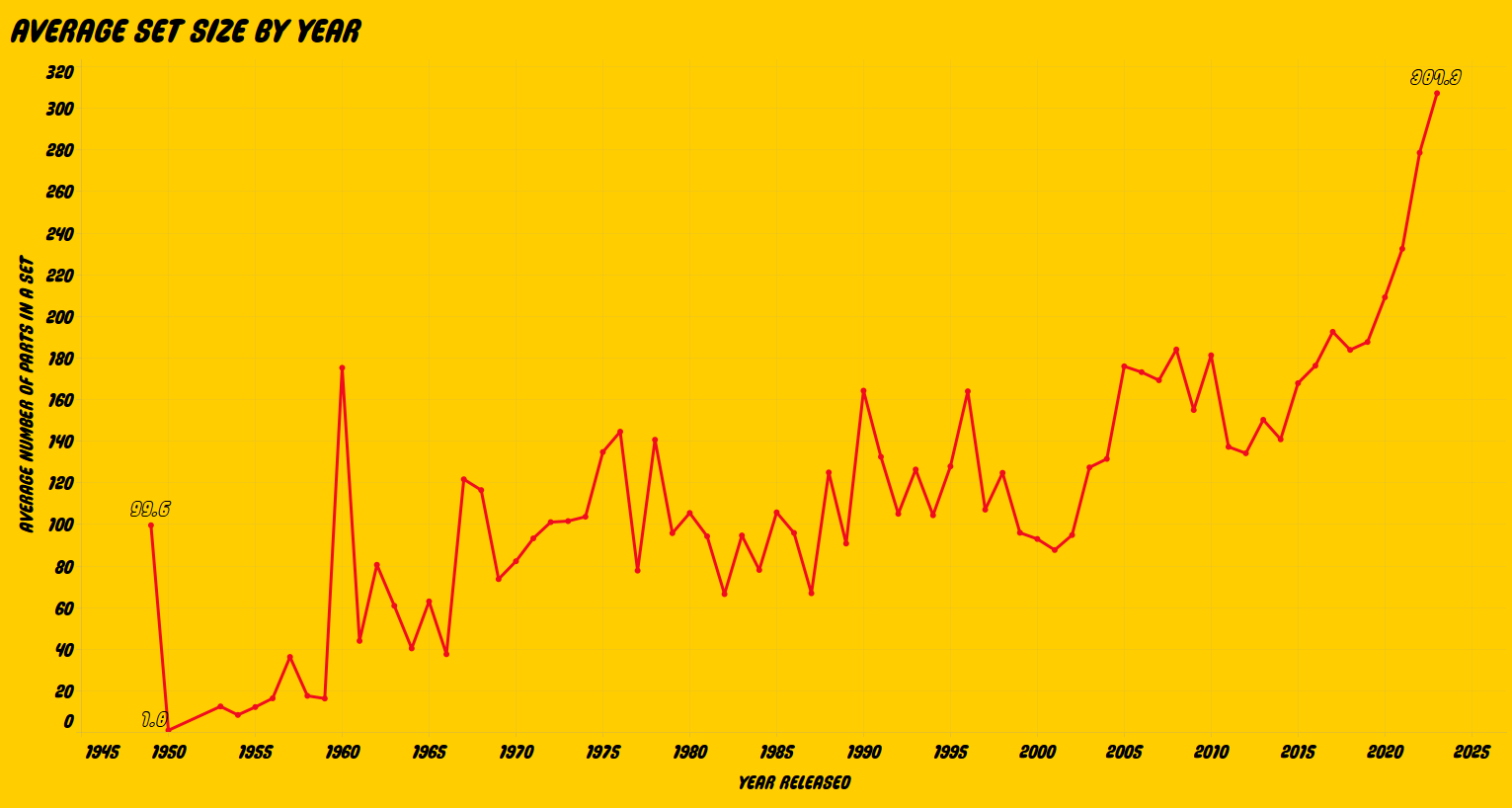
After importing the data into Microsoft SQL Server, I got started on my queries. I first wanted to look at how the average LEGO set size (in terms of number of parts) has changed over time. To achieve this, I wrote the following query to pull the year released and the average number of parts in the sets released that year:
SELECT
	year_released,
	ROUND(AVG(number_of_parts), 1) AS avg_num_parts
FROM lego_sets_and_themes$
WHERE year_released IS NOT NULL
GROUP BY year_released
ORDER BY year_released
Here is a preview of what the output of this query looks like:
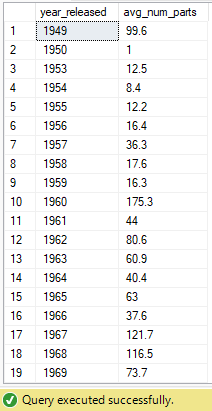
Throwing this into Tableau, we get this visualization:
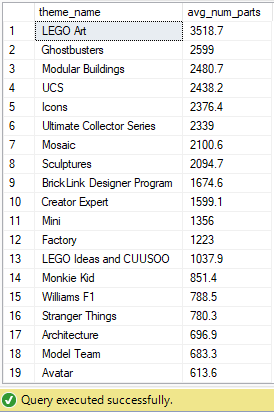
Next, I wanted to explore how different themes have evolved in terms of the average set size. To achieve this, I wrote this query to pull each theme's average set size (in terms of number of parts):
SELECT
	theme_name,
	ROUND(AVG(number_of_parts), 1) AS avg_num_parts
FROM lego_sets_and_themes$
GROUP BY theme_name
ORDER BY avg_num_parts DESC
This query returns the following result:
Visualizing this with Tableau gets us the following result:

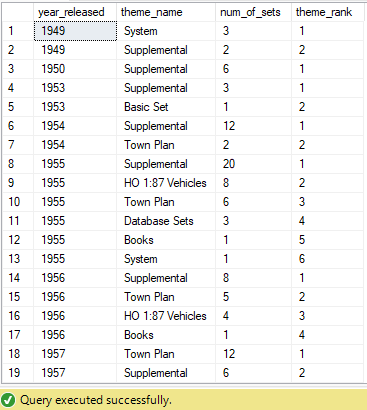
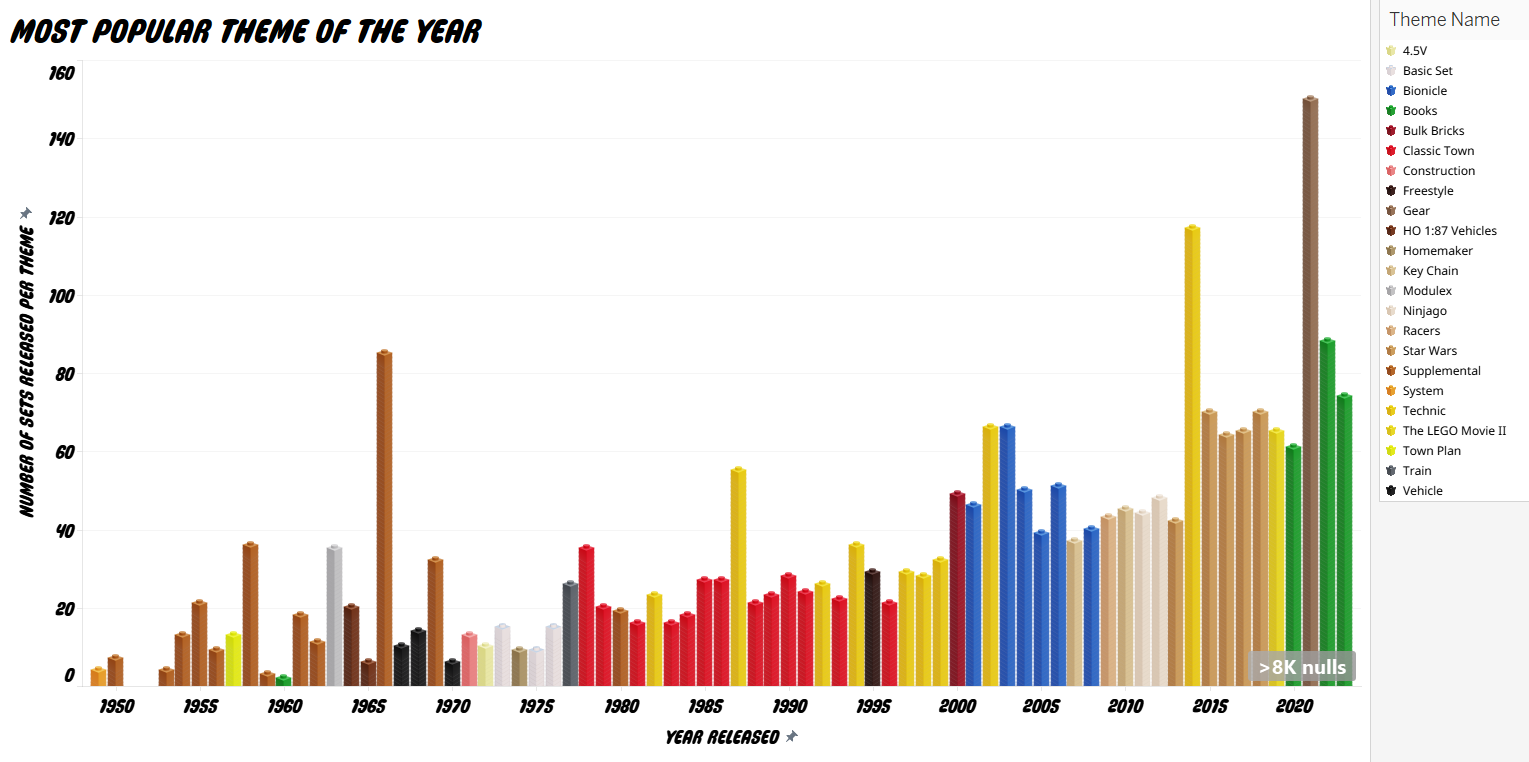
Next, I wanted to know what the most popular theme of each year was, and how many sets were released in that theme that year. First, I wrote this query to partition the data by the year released and to order the themes released by the number of sets released in descending order. I added a column to rank these themes based on that order.
SELECT
        year_released,
        theme_name,
        COUNT(theme_name) AS num_of_sets,
        ROW_NUMBER() OVER(PARTITION BY year_released ORDER BY COUNT(theme_name) DESC) AS theme_rank
FROM lego_sets_and_themes$
WHERE year_released IS NOT NULL
GROUP BY year_released, theme_name
This query gives us an output that looks like this:
However, I only want the most popular theme of the year, so I create a CTE with this query and pull only the rank 1 results.
WITH RankedThemes AS
(
    SELECT
        year_released,
        theme_name,
        COUNT(theme_name) AS num_of_sets,
        ROW_NUMBER() OVER(PARTITION BY year_released ORDER BY COUNT(theme_name) DESC) AS theme_rank
    FROM lego_sets_and_themes$
    WHERE year_released IS NOT NULL
    GROUP BY year_released, theme_name
)
SELECT year_released, theme_name, num_of_sets
FROM RankedThemes
WHERE theme_rank = 1
ORDER BY year_released
So now we only see the most popular theme of each year, and the number of sets that were released in that theme that year.
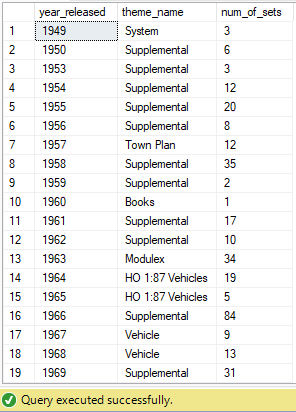
This data can be put into a typical bar chart. However, I wanted to to use LEGO brick towers instead of typical bars in this visual, so I used MecaBricks to render 23 different colored (for 23 different LEGO theme names) 1x1 lego bricks as the basis for my brick tower bar chart.
.png)
.png)
.png)
.png)
.png)
.png)
.png)
.png)
.png)
.png)
.png)
.png)
.png)
.png)
.png)
.png)
.png)
.png)
.png)
.png)
.png)
.png)
.png)
I then had to create custom calculated fields to be able to plot these bricks into towers. The result, is the following:
Lastly, I wanted to create a word cloud to show the most commonly used words in LEGO set names. This is when it starts getting complicated. I approached this by first had to writing a query to extract each word out of the set names. I approached this by replacing the spaces in between words with periods and using PARSENAME to then extract each of the words out of the set name, and into their own column.
SELECT
	set_name,
	--PARSENAME(REPLACE(set_name, ' ', '.'), 5),
	PARSENAME(REPLACE(set_name, ' ', '.'), 4) AS word1,
	PARSENAME(REPLACE(set_name, ' ', '.'), 3) AS word2,
	PARSENAME(REPLACE(set_name, ' ', '.'), 2) AS word3,
	PARSENAME(REPLACE(set_name, ' ', '.'), 1)AS word4
FROM lego_sets_and_themes$
	--WHERE PARSENAME(REPLACE(set_name, ' ', '.'), 5) IS NOT NULL
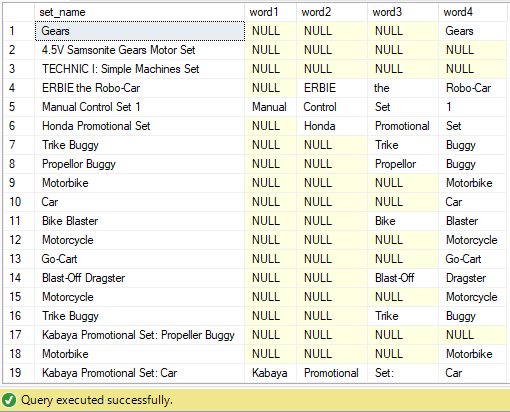
Running this query, we get each words extracted from the set names, as desired.
Currently, the extracted words are all in different columns, so the next thing I needed to do was to combine the four columns into one. I achieved this by creating a CTE with the previous query, and using UNION ALL to combine the four columns into one, like so:
WITH WordCloudCTE AS(
	SELECT
		set_name,
		PARSENAME(REPLACE(set_name, ' ', '.'), 4) AS word1,
		PARSENAME(REPLACE(set_name, ' ', '.'), 3) AS word2,
		PARSENAME(REPLACE(set_name, ' ', '.'), 2) AS word3,
		PARSENAME(REPLACE(set_name, ' ', '.'), 1)AS word4
	FROM lego_sets_and_themes$
)SELECT word1
	FROM WordCloudCTE
	UNION ALL
	SELECT word2
	FROM WordCloudCTE
	UNION ALL
	SELECT word3
	FROM WordCloudCTE
	UNION ALL
	SELECT word4
	FROM WordCloudCTE
This gives us all of our extracted words in a single column.
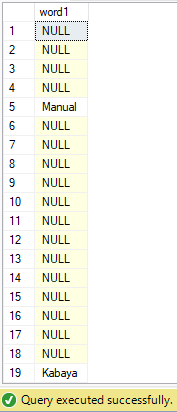
Of course, we need to remove all of the nulls from this list. After scanning through the list, I found words with commas, parentheses, dashes, etc. attached to them, so I use REPLACE to eliminate these characters so we have a list of only words. I also remove common words such as "the", "in", "for", etc. and other values that are not words. I also now need to group all of the common words together, and count how many times each word appears in the LEGO set names. I do this using COUNT and GROUP BY. I am also only interested in words that appear more than once in the set names. The result is the following query:
WITH WordCloudCTE AS
(
	SELECT
		set_name,
		PARSENAME(REPLACE(set_name, ' ', '.'), 4) AS word1,
		PARSENAME(REPLACE(set_name, ' ', '.'), 3) AS word2,
		PARSENAME(REPLACE(set_name, ' ', '.'), 2) AS word3,
		PARSENAME(REPLACE(set_name, ' ', '.'), 1)AS word4
	FROM lego_sets_and_themes$
)
SELECT
	REPLACE(REPLACE(REPLACE(REPLACE(REPLACE(REPLACE(REPLACE(word1, '(', ''), ')', ''), '{', ''), '}', ''), ':', ''), ',', ''), '!', '') AS Word,
	COUNT(REPLACE(REPLACE(REPLACE(REPLACE(REPLACE(REPLACE(REPLACE(word1, '(', ''), ')', ''), '{', ''), '}', ''), ':', ''), ',', ''), '!', '')) AS Count
FROM (
	SELECT word1
	FROM WordCloudCTE
	UNION ALL
	SELECT word2
	FROM WordCloudCTE
	UNION ALL
	SELECT word3
	FROM WordCloudCTE
	UNION ALL
	SELECT word4
	FROM WordCloudCTE
	) AS WordList
WHERE word1 NOT IN ('NULL', 'at', 'for', 'from', 'I', 'II', 'in', 'it', 'the', '-', '--', '#1', '#2', '#3', '#4', '#5', '#6', '#7', '#8', '&', '(1)', '(13)', '(17)', '(18)', '(19)', '(2)', '(20)', '(2012', '(2015', '(21)', '(23)', '(4', '(42', '(5)', '(6', '(4)', '(6)', '(7)', '(8)', '(9)', 'and', '/', '+', '0', 'with', 'of', '07', '1', '-1-', '1/2', '1/3', '1', '110', '117', '124', '1300', '155', '18', '187', '19', '10', '100', '1001', '1030', '1032', '1090', '1092', '1100', '12', '1-2', '1210-2', '123', '1-2-3', '125', '128cm', '13', '1307-1', '1308-1', '1500', '150°', '16', '17M', '1800', '19', '1909', '1913', '1926', '1965', '1968', '1969', '1970', '1989', '1992', '1999', '2', '-2-', '20', '200', '2000', '2001', '2002', '2003', '2004', '2005', '2006', '2007', '2008', '2009', '2010', '2011', '2012', '2013', '2014', '2015', '2016', '2017', '2018', '2019', '2020', '2021', '2022', '2023', '2024', '21', '210-2', '220', '24', '248', '25', '250', '258-2', '259-1', '25th', '2-6', '260', '2600', '261-2', '3', '-3-', '3+', '300', '3000', '307-2', '308-3', '310-5', '3245', '33', '35', '350', '37', '38', '3×3', '4', '4+', '40', '400-Piece', '42mm', '430', '45', '458', '4614581-1', '47', '48', '488', '5', '50', '500', '512', '52', '560-4', '6', '6000', '626', '64', '6500', '697', '7', '727', '7777', '787', '8', '8-', '800', '8000', '812', '85', '8748-1', '8888', '8889', '8890', '8891', '9', '90', '911', '918', '919', '963', '9654', '9800', 'a', '110')
GROUP BY word1
HAVING COUNT(REPLACE(REPLACE(REPLACE(REPLACE(REPLACE(REPLACE(REPLACE(word1, '(', ''), ')', ''), '{', ''), '}', ''), ':', ''), ',', ''), '!', '')) > 1
ORDER BY Count DESC
This monster of a query, that can take a while to run due to its complicated nature, gives us the following output:
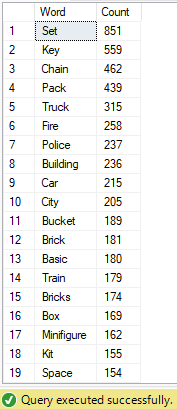
I can then use this data to create a word cloud with Tableau.
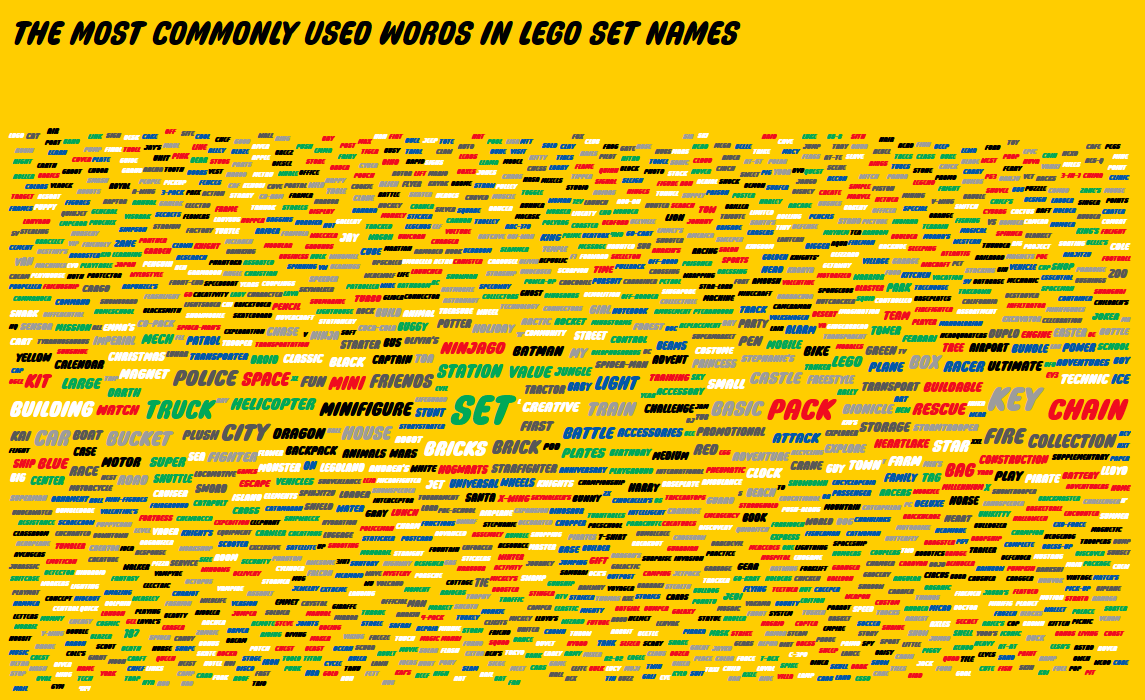
FINALLY, I present you the completed dashboard. Please view on desktop for optimal experience.

Thank you for reading until the end. Here are the associated links with this project: